

Meter Information
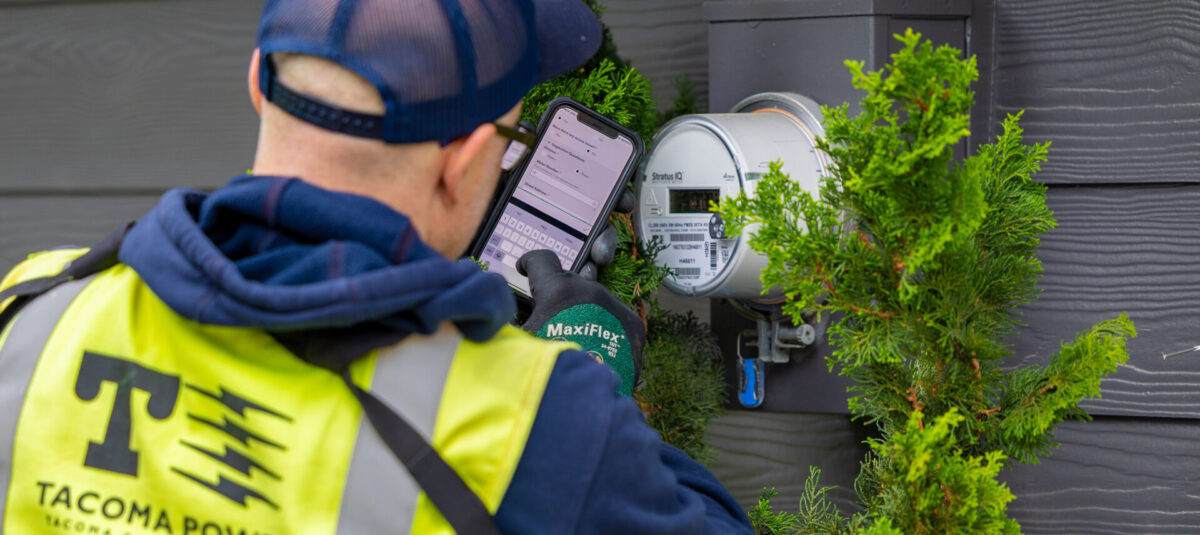
We commit to providing safe and reliable utility services. Our team will periodically inspect your power and water meters to support that commitment.
We kindly ask that you:
- Maintain a clear workspace at least 3 feet by 3 feet in front of the meter.
- Remove any obstacles, including overgrown vegetation and parked vehicles.
If your meter is behind a locked gate, contact us at 253-502-8600 to provide access information, such as a key or code.
Our team members will always wear uniforms and carry identification.
Meter surveys may result in a vegetation trim notice or a request for access notice. Use the information below to help you locate your meter and ensure it is accessible. You can also learn how to read your new advanced meter and more!
-
Residential water meter
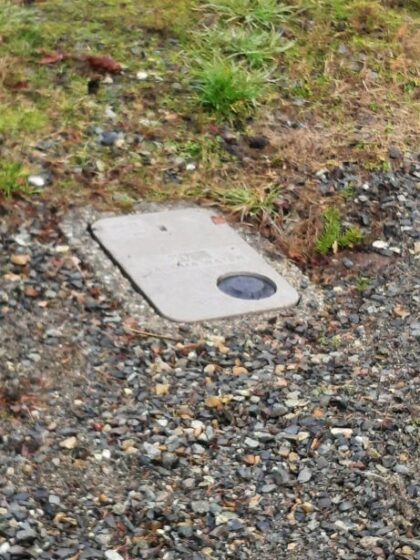
Residential and small business water meters are typically located by the curb in front of the house, near the sidewalk or street, and housed in a concrete box marked “water.” The meter is often in a public right-of-way.
Residential and small business water meters are typically located by the curb in front of the house, near the sidewalk or street, and housed in a concrete box marked “water.” The meter is often in a public right-of-way.
Most large commercial water meters are located at or near the front of the business. Some meters are located on the street at the rear of the building, and some businesses may have more than one water meter.
-
Residential and small business electric meters are typically located on the side or back of your house.
Large commercial electric meters may be located outside your building, in a meter room, or inside your business.
-
Yoke Stop Valve
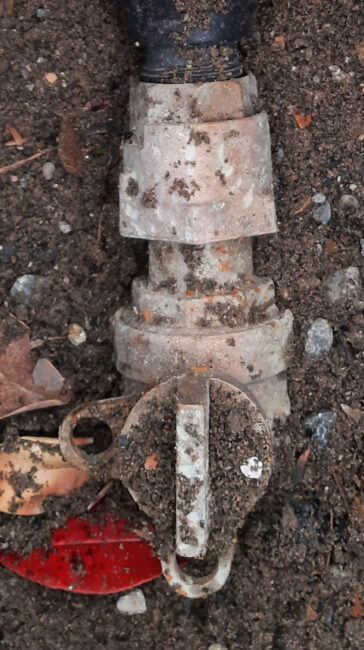
You should turn on/off the service using the existing whole-house shutoff valve on your property (often in the crawlspace, valve box, or near the water heater). In an emergency, you may turn the service on/off using the existing equipment (yoke stop valve) within the city meter box (see image).
Use a long screwdriver or similar tool to remove the lid by using the lifting slot. When removing the meter box lid, be careful not to disconnect or damage the advanced meter communications wire. When replacing the lid, ensure the cable is not caught between the box and the lid. Once replaced, the lid should fit level with the surrounding grade without rocking.
If you damage the utility equipment, you may be charged a fee. Call 253-502-8600 to have a water meter service worker turn off your service.
-
 You can access detailed usage data and check for leaks by logging into MyAccount.
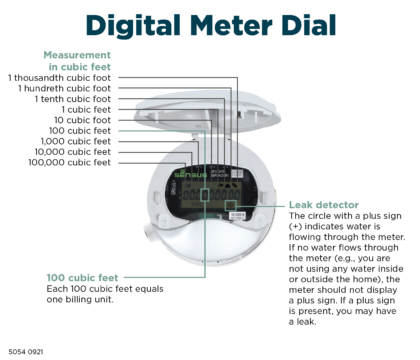
 If you need to read the meter, read from left to right. The first four numbers represent the total water volume of usage through the meter. Usage is displayed cumulatively since meter installation and measured in CFF (centum cubic feet or 100 cubic feet).
To determine how much water you’ve used, subtract your previous meter reading from the present one. Water usage is billed per CCF (1 CCF equals 100 cubic feet, or 748 gallons).
The position value of each number on the meter, from left to right, are as follows:
- 100,000 cubic feet
- 10,000 cubic feet
- 1,000 cubic feet
- 100 cubic feet
- 10 cubic feet
- 1 cubic foot
- 1 tenth cubic foot
- 1 hundredth cubic foot
- 1 thousandth cubic foot
If a plus sign (+) is shown inside the circle on the meter display, water is flowing through the meter.
-
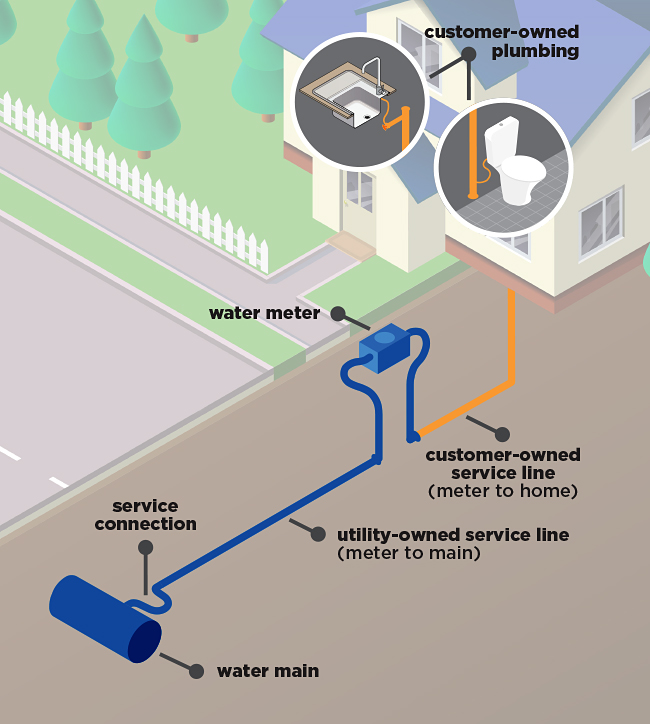
Looking at the picture above, Tacoma Public Utilities owns and maintains the blue water main, service line, and water meter. You own and are responsible for the property-side service lines and plumbing, shown above in orange.
-
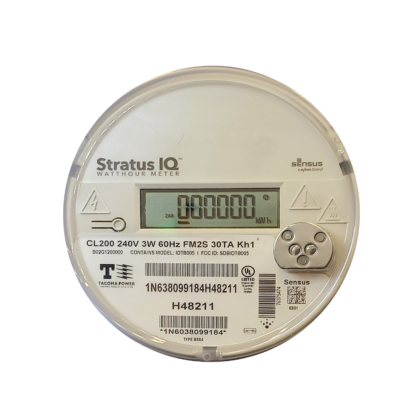 Advanced electric meters have multiple channels, which allow the meter to periodically display different pieces of information.
 The first display is 888888, which is simply a check to ensure the display is functioning correctly. The next display flash shows the total electricity usage through the meter. Usage is displayed cumulatively since meter installation and measured in kWh (kilowatt-hours). We use this number for billing.
To determine how much electricity you’ve used, subtract your previous meter reading from the present one. For power, usage is billed per kWh used.
*Some commercial customers have a multiplier applied to their meter reading to calculate the actual kWh billed.
Residential Solar Meters
Most solar customers have two of the electric meters pictured above, a Production (or Generation) meter and a Net Meter. The Production meter measures electricity generated by the solar panels in kWh before home consumption. This can also be accomplished on a solar customer’s solar monitoring app or other customer-owned production monitoring equipment. If excess electricity (electricity that cannot be used in the home when it is produced) is sent to Tacoma Power’s grid, it will be measured on the Net Meter’s second channel (the second number to appear after the display shows 888888). The net meter also measures electricity purchased from Tacoma Power in kWh. That is shown on the first channel of the Net Meter (the first number to appear after the display shows 888888). To determine your bill, the amount of electricity sent to Tacoma Power is subtracted (or credited) from the amount purchased from Tacoma Power. The information shown on the Production Meters is not used to calculate customer electricity bills.
If you see 888888, there is no concern; it is simply a check to ensure the display is functioning properly.
-
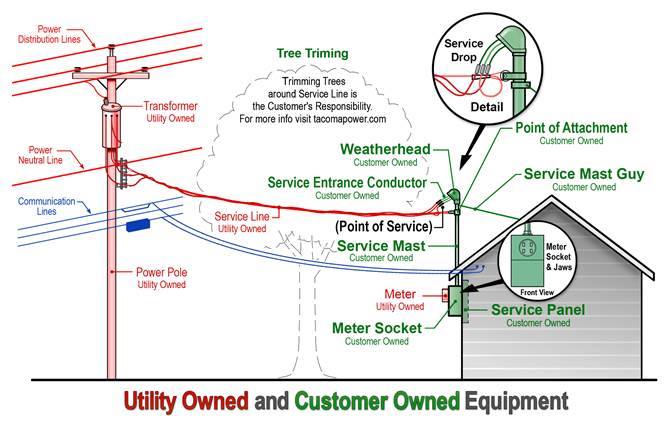
Looking at the picture above, Tacoma Public Utilities owns and maintains everything shown in red. You own and are responsible for the property-side equipment, shown in green. Blue represents non-utility-owned equipment, typically cable, phone, or internet providers.
Advanced Meter FAQs
-
Advanced meters are two-way communication devices that measure and transmit electric and water usage data to provide us with accurate billing determinants and detailed system information. We also use this data to restore service more quickly and reduce the length of outages and system emergencies. The usage data from homes and businesses is sent from the meter to the utility over a wireless network. Residential usage information is typically sent to us about 24 times per day using radio frequency transmission. This is like the wireless communications used by cell phones and WiFi.
-
Advanced meters allow us to offer monthly billing, selectable bill due date, faster outage and leak detection, prepayment options for power, remote turn-on and turn-off of electricity for easier move in, move out, and reconnection, and detailed, near real-time usage information through a customer web portal.
-
Advanced meters are a foundational modernization project and deliver key benefits right away. Modernization projects typically build on one another over time. Some customer benefits or data are enabled by advanced meters and delivered through related utility modernization projects, such as TPU’s Customer Engagement Portal.
-
We are committed to high-quality customer service and have developed an Opt-Out Policy.
If you do not want a communicating advanced meter, you can opt out and have the radio frequency transmitter turned off.
If you opt-out, you will be charged $15 per month. This fee covers the continue manual meter reading of your meter.
There is no opt-out option for residential water or commercial accounts.
View Opt-Out Policy details here.
Apply to Opt-Out here.To request a paper opt-out application, please email TPUCSBillingOfficeTeam@tacoma.gov or call 253-502-8509.